

The Windows Application Compatibility (Shim) Infrastructure is a mechanism designed to ensure backward compatibility of legacy applications on modern versions of Windows. In simple terms it enables older software developed for older Windows versions to run on newer Windows versions without requiring source code modifications.
At the heart of this infrastructure lies a layered system of API interception, compatibility databases, and metadata caching , all working together to make applications work like they’re running in their native environment.
However, beyond its functional purpose, this system leaves behind digital footprints that have become invaluable to digital forensic investigators and incident responders.
Two of the most critical artifacts generated by this ecosystem are:
- ShimCache (AppCompatCache)
- AmCache (Auto-Start Application Cache)
These caches store metadata about executable files and installed applications, providing insight into program execution, file access, installation events, and even adversarial persistence techniques.
The Shim Infrastructure: How It Works and where Shimcache and Amcache fit
Windows applications are built using the Portable Executable (PE) format, which includes metadata in headers describing how the program should be loaded and executed. One key part of this format is the Import Address Table (IAT).
- The IAT contains a list of functions (APIs) that the application needs from system DLLs
- When the application starts, Windows fills the IAT with actual memory addresses of those APIs.
- Every time the app calls a Windows function, it goes through the IAT to find where that function lives in memory.
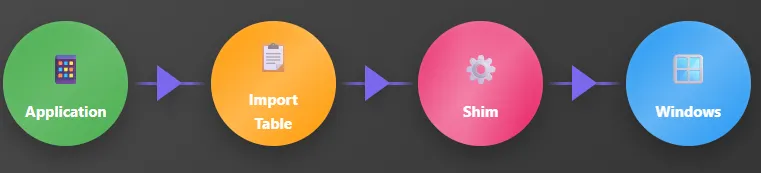
Direct Path : The application makes calls directly to Windows APIs through the Import Address Table (IAT). This is the standard flow for normal application execution.
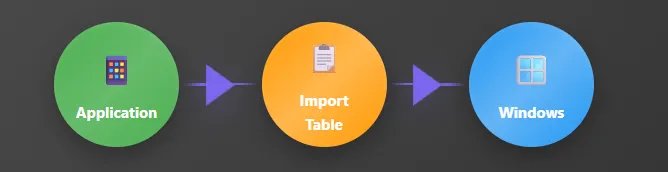
Intercepted Path: For older applications the Import Address Table is modified to redirect API calls through the shim layer first. The shim applies compatibility fixes and then forwards the calls to the actual Windows APIs.
I know what you’re thinking… Yes, shims can be abused but don’t worry my fellow defenders there’s good news , shims have built-in limitations that keep them from turning into total chaos.
-
Shims Run in User Mode and Not Kernel Mode
-
No Direct Security Bypasses ( But Tricks exist …)
-
App-Specific ( But Tricks exist …)
But : Attackers don’t need kernel access to abuse shims, they can:
- Inject malicious DLLs into trusted processes
- Use legitimate shimming mechanisms to hijack execution flow
- Abuse Application Compatibility Database (.sdb files) to force shimming on arbitrary executables
This is known as Application shimming (MITRE T1546.011), it has been used by advanced adversaries such as FIN7 and the SDBbot Rat to establish persistence and escalate privileges and is also leveraged in red team operations to bypass security controls like UAC.
Recommended Defenses :
- Understand the technical workflow of the image loader and shim engine ( When the loader initializes the execution environment and calls LdrInitializeThunk() in ntdll.dll to set up core structures like the heap, TLS, and IAT apphelp.dll is loaded to check for compatibility settings in the registry, and if a shim is required, the corresponding .sdb database is parsed to apply fixes …. Understanding this full flow is critical because it reveals how attackers can silently inject code or escalate privileges under the radar of traditional defenses.)
- Treat .sdb files as executable code
- Deploy detections for sdbinst.exe and .sdb file creation and modification
process where host.os.type == "windows" and event.type == "start" and process.name : "sdbinst.exe" and process.args : "?*" and not (process.args : "-m" and process.args : "-bg") and not process.args : "-mm"- Integrate detection rules for high-risk shims like:
RedirectEXE InjectDLL DisableWindowsDefender 😵 TerminateExe
🔗 Potential Application Shimming via Sdbinst | Elastic Security [8.18] | Elastic
🔗 The Real Shim Shady: PowerPoint Presentation
🔗 Pillowmint: FIN7’s Monkey Thief
🔗 Get2 Downloader & SDBbot RAT Analysis | Proofpoint US
🔗 eu-15-Pierce-Defending-Against-Malicious-Application-Compatibility-Shims-wp.pdf
🔗 Secrets of the Application Compatilibity Database (SDB) — Part 1 — Alex Ionescu’s Blog
Now, Let’s Get to the Real Work: Forensic Artifacts
1 - ShimCache :
- Full Name: Application Compatibility Cache (AppCompatCache)
- Location (Registry): The AppCompatCache is stored in the SYSTEM registry hive:
Windows XP :
SYSTEM\CurrentControlSet\Control\SessionManager\AppCompatibility\AppCompatCache- Maximum entries: 96 (Server 2003 up to 512 entries)
Windows 7+:
SYSTEM\CurrentControlSet\Control\SessionManager\AppCompatCache\AppCompatCache- Maximum entries: 1,024
- Includes InsertFlag (some indication of execution, but not definitive)
Purpose: Tracks executables evaluated by the shim engine , even if not executed ( Yep even if not executed. And that’s where its power lies. )
Critical ReminderA ShimCache entry ≠ proof of execution. It only confirms the file was present and scanned by the Shim engine. But don’t worry this is just one piece of the puzzle. We can combine it with AmCache, Prefetch, SRUM, and other logs to build a full timeline.
When Is ShimCache Updated?
In Memory First: Entries are stored in memory during system runtime.
Written to Disk: Only during a clean shutdown or reboot.
- If the system crashes or is powered off abruptly, recent ShimCache entries may be lost.
- But they can survive in Memory dumps , hiberfil.sys , or pagefile.sys
Pro Tip: Always collect memory artifacts. Tools like Volatility or RedLine can recover volatile ShimCache entries that never made it to disk.
Multiple AppCompatCache Databases May Exist :
Windows maintains multiple control sets within the SYSTEM hive, each potentially containing different AppCompatCache data. The active control set is located at:
HKEY_LOCAL_MACHINE\SYSTEM\CurrentControlSetFor offline forensic analysis, you need to determine the current control set by checking the value in:
HKEY_LOCAL_MACHINE\SYSTEM\Select\CurrentAnalyzing historical control sets may provide additional forensic evidence.
Key Information Stored
The cache stores different types of metadata depending on the Windows version:
- File Full Path : Complete path
- File Size : Varies by OS ( Windows XP )
- Last Modified Time: From the file’s MFT record at time of access
- ShimCache Last Updated Time : When the entry was added/updated in the cache
In current Windows versions: Last Modified Time ≠ ShimCache Last Updated Time
- InsertFlag (Vista+) : some indication of execution, but not definitive
Key Forensic Characteristics :
1. Logs Files Without Execution : Executables can be added to ShimCache before they run just by:
- Viewing them in Windows Explorer
- Extracting a ZIP containing EXEs
- Downloading a file (even if never clicked)
2. Survives File Deletion :
- If an attacker deletes a malicious executable (and its Prefetch file), ShimCache may still retain:
Full path
Last modified timestamp
Entry in the cache
3. Tracks Renamed or Modified Files :
- If a file like psexec.exe is renamed to svchost.exe, both names may appear in ShimCache.
- If a file is rewritten or modified, it gets re-evaluated → new entry added.
4. Detects Time Manipulation (Timestomping)
- ShimCache stores the last modified time of the executable at the time of access.
- Compare this with the file’s current timestamp:
If they don’t match → timestomping likely occurred (anti-forensic tactic).
🔗 Understanding Microsoft’s Application Compatibility Cache (ShimCache) in Digital Forensics
🔗 Let’s Talk About Shimcache — The Most Misunderstood Artifact
Tools for ShimCache Analysis
Eric Zimmerman’s AppCompatCacheParser : 🔗 GitHub — EricZimmerman/AppCompatCacheParser: AppCompatCache (shimcache) parser. Supports Windows 7 (x86 and x64), Windows 8.x, and Windows 10
Mandiant’s ShimCacheParser.py :🔗 GitHub — mandiant/ShimCacheParser
2 - AmCache :
- Full Name: Auto-Start Application Cache
- File Location:
%SystemRoot%\AppCompat\Programs\Amcache.hve- Introduced In: Windows 8
- Backported To: Patched Windows 7 systems
- Replaces: RecentFileCache.bcf (RFCB)
- Key Feature: Tracks executables, drivers, and installed applications with rich metadata including SHA1 hashes
Why It Matters:_ AmCache provides one of the few forensic sources that includes cryptographic hashes making it invaluable for identifying renamed malware, signed binaries, and LOLBins._
Unlike RFCB which only stored basic file paths AmCache tracks a wealth of metadata, including:
- Full file path
- File size
- Timestamps (creation, modification, etc.)
- Publisher information (from digital signatures)
- SHA1 hash of the file (for files < 31.4 MB)
- Installation source (MSI, USB, network…)
- Binary type (EXE, DLL, driver …)
AmCache Format Changes
Microsoft has significantly changed the AmCache database structure at least four times since its introduction not based on OS version, but on DLL version and patch level.
The format of Amcache.hve is driven by the version of apphelp.dll, not the operating system itself. This means:
- Two Windows 10 machines may have different AmCache structures if one is unpatched and the other is fully updated.
- A patched Windows 7 machine may have the same format as a modern Windows 11 system.
Implication: You cannot assume the structure based on OS alone. Always verify the patch level and use format-aware tools.
🔗 Analysis of the AmCache Blanche Lagny’s research remains the gold standard for understanding both legacy and modern AmCache formats.
What Data Does AmCache Store?
- Full File Path
- File Size
- Timestamps
- Publisher / Signer Info
- SHA1 Hash
- Binary Type
- Installation Source
Limitation: SHA1 hashes are only computed for files under 31,457,280 bytes (~31.4 MB). This is likely an efficiency mechanism to avoid performance degradation from hashing large installers.
Note: File size is still recorded even for files above the hash limit.
How Files Get Into AmCache: The Three Categories (Blanche Lagny)
Blanche Lagny’s research identified three primary mechanisms that cause a file to be recorded:
1. Executed (and shimmed) GUI Applications
Applications launched via GUI that required shimming for compatibility
2. Executables Copied During Application Execution
Files copied or extracted as part of running an app
3. Files in Scanned Directories
The Executables inProgram Files,Program Files (x86), or Desktop scanned by theMicrosoft Compatibility Appraiserscheduled task
Only Category 1 involves actual execution and even then, only GUI apps that needed shimming. The vast majority of entries come from Categories 2 and 3, meaning AmCache is better viewed as a presence indicator than an execution log._
Forensic Value: Why AmCache Still Matters
Despite not proving execution, AmCache is one of the most valuable artifacts in modern investigations because it:
1. Tracks File Presence with Rich Metadata
- Even if a file was never executed, AmCache may still record:
- Its full path
- Publisher info
- SHA1 hash
- Timestamps
This is critical for detecting dropped tools, staged payloads, or lateral movement artifacts.
2. Detects Renamed Malware
- A file renamed from mimikatz.exe to notepad.exe will still have the same SHA1 hash.
- Compare the hash against known malware databases — and expose the deception.
3. Reveals Installation Sources
- AmCache logs whether a file came from:
- A USB drive
- An MSI installer
- A network share
This helps trace initial access vectors and persistence mechanisms.
4. Survives File Deletion
- Like ShimCache, AmCache entries persist even after the file is deleted.
- This is crucial when attackers clean up the hash and path remain.
Best Practice: Correlate AmCache with Prefetch: If a file appears in both, high confidence it was executed.
Tools for AmCache Analysis
- Eric Zimmerman’s AmCacheParser : Industry-standard tool. Parses all known formats. Supports timeline output.
🔗 GitHub — EricZimmerman/AmCacheParser
- KAPE + AmCache Module : Fast collection and parsing in triage scenarios.
🔗 KAPE
- Regipy (Python) : Open-source parser for automation and scripting.
🔗 GitHub — log2timeline/regipy
Pro TipAlways use updated parsing tools older versions may misinterpret newer AmCache structures._
Check Task Scheduler for:
\Microsoft\Windows\Application Experience\Microsoft Compatibility AppraiserIf disabled, AmCache may be incomplete.
🔗 Read my full post on Prefetch here : Windows Forensics : Prefetch. Prefetch is a utility that is intended… | by @omayma | Aug, 2025 | Medium