

Prefetch is a utility that is intended to improve Windows and application startup performance by loading application data into memory before it is demanded.
- Creation: A prefetch file is generated the first time an application is executed from a specific path.
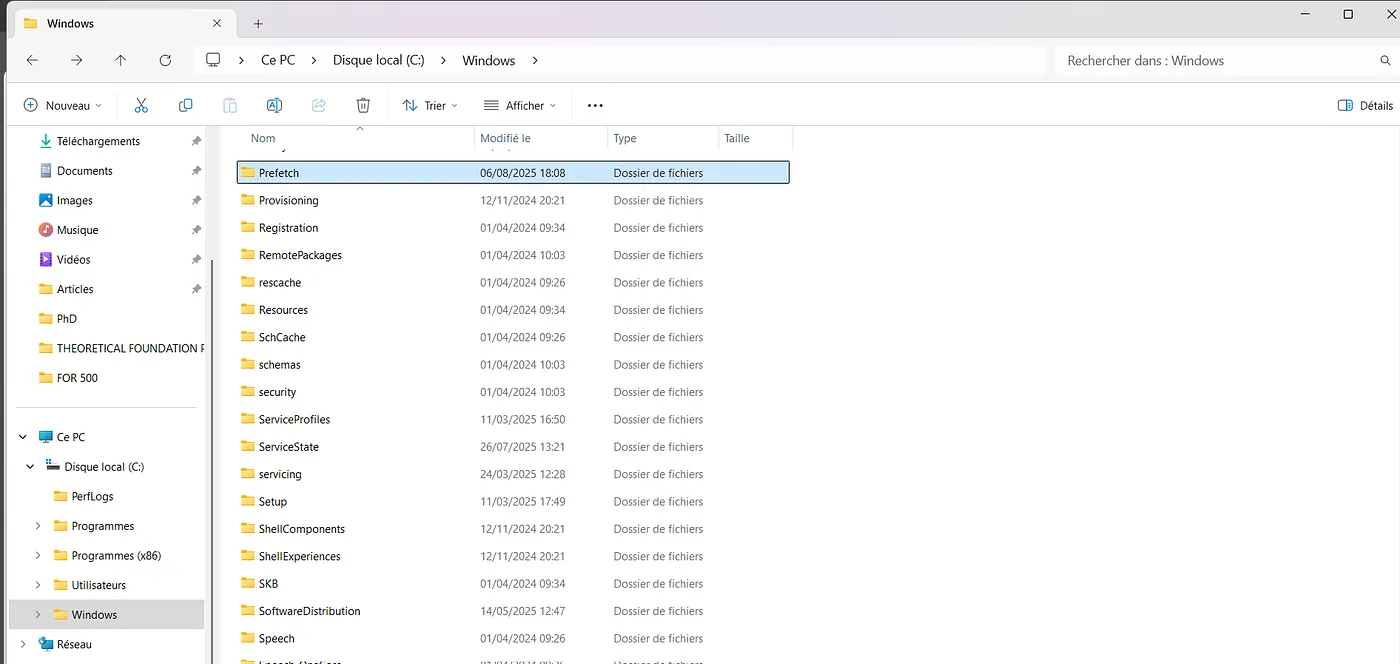
- Location: Stored in
C:\Windows\Prefetch
- File Naming Convention:
[ApplicationName]-[8-character_hash_of_path].pf
Example: ANYDESK.EXE-D0317C50.pf
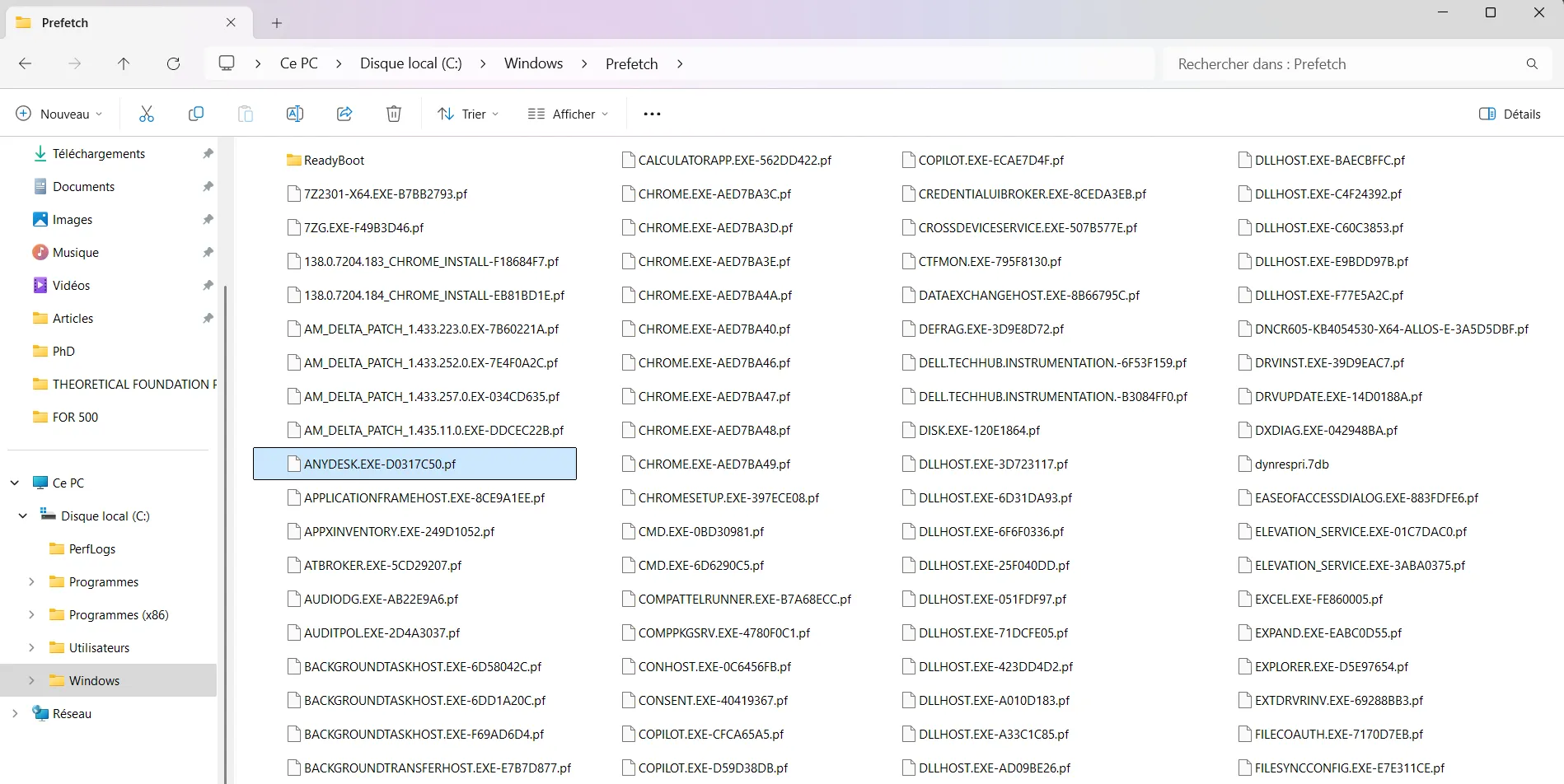
The hash in the filename corresponds to a value calculated from the full device path of the executable using an iterative polynomial hash with specific constants that vary by Windows version.
For most executables, the hash is derived solely from this device path. However, for hosting applications like svchost.exe, the hash also includes the command line used to launch the application in these cases, the final hash is the sum of two parts: one computed from the executable’s device path, and another from the case-sensitive and space-sensitive command line.
Additionally, the assignment of volume numbers affects the device path. On Windows 7 and later, the presence of a 100MB system reserved partition means the C: drive is typically assigned HarddiskVolume2, not Volume1, which changes the input to the hash function and even small changes such as letter case , extra spaces, or different command-line formatting can result in a completely different hash. This makes the prefetch hash precise but tricky to reverse.
You can read more on that here :🔗 Prefetch Hash Calculator + a hash lookup table xp/vista/w7/w2k3/w2k8 | Hexacorn
Each prefetch file contains:
- Hash of the original path of the application
- Application name
- The number of times the application was run
- Timestamps for the last eight times the application was run (Windows 8+)
Prefetch File Limits by OS Version
- Windows 7 and older : 128
- Windows 8 and newer : 1,024
Why Are Prefetch Files Important in Digital Forensics?
- Prove Program Execution even if the original executable has been deleted.
- Support Anti-Forensics Detection ;can reveal use of tools like CCleaner or other cleanup utilities used to erase evidence.
- Aid Malware InvestigationsHelp identify when and how often malicious executables were run.
- Enable Timeline Analysis by provide timestamps that help reconstruct a user’s or attacker’s activity over time.
- Link Related Activity : Multiple prefetch files with the same path hash may indicate execution from the same (possibly deleted) directory, useful in identifying malware clusters.
How to Analyze Prefetch Files: Using PECmd.exe ( My favorite yet)
One of the best tools for analyzing prefetch files is PECmd.exe, developed by Eric Zimmerman (free and open source).
🔗 https://ericzimmerman.github.io
Features of PECmd:
Parses all data from .pf files
Extracts:
- Execution timestamps
- Run count
- File and directory interactions
- Metadata (size, version)
Can analyze:
- A single prefetch file
- Entire Prefetch directory
Exports results to CSV, TLE (Timeline Explorer), or JSON
Example: Analyzing a Single Prefetch File
Running PECmd against EVIL.EXE-12345678.pf gives output like:
Created on: 2022-08-18 19:19:18Modified on: 2022-08-18 19:19:18Last Accessed: 2022-08-18 19:19:18Executable: EVIL.EXESize: 102,400 bytesVersion: 1.0.0.0Run Count: 1Last Run: 2022-08-18 19:19:08 ← Actual execution timeFiles Referenced: C:\Users\Bob\AppData\Temp\EVIL.EXE C:\Windows\System32\kernel32.dll E:\USBDrive\config.datDirectories Referenced: C:\Users\Bob\AppData\Local\Temp E:\USBDriveWhat are we seeing ?
- The file ran once, from a user temp folder (a red flag!)
- It accessed a USB drive (possible data exfiltration)
NOTEPrefetch records 10 seconds of post-execution activity( sometimes less depending on the exucatable size but its what is mentioned in documentation ) including:
- Files accessed
- Registry keys opened
- DLLs loaded
Because of this, the actual execution time is typically 10 seconds earlier than the file system timestamp (creation/modification) of the .pf file
Prefetch is disabled by default in Windows servers / enabled by default in Windows workstations
🔗 Forensic Value of Prefetch — SANS Internet Storm Center
🔗Invoke-IR | PowerShell Digital Forensics and Incident Response
🔗Disabling Prefetch | Microsoft Learn
🔗Forensic Analysis of Prefetch files in Windows — Magnet Forensics